Hello! It has been a solid two months since I posted my last dev diary on this project. A lot of that is mostly to do with me taking some time off before immediately getting caught up in a week-long work trip, followed by a brief illness. However, while the work on the project has been at highs and lows in this period, I have been striking the iron!
There has been a bunch of minor changes including bug fixes and tweaks, alongside some more major systems additions that will help me get to a first technical prototype for the itch.io page.
Handling Spawns and Room Transitions and Persistence
The first system implementation is the handling of a SpawnManager. At this point, GM2 runs as my graphics engine and compiler as I have found myself essentially wiring up systems one-by-one to craft the project in the way I want to handle it. Because object instances destroy when you leave a Room and re-create in another, the first few updates in May involved tackling this problem. The Character class originally provided logic for collision, but it now maintains the persistent data and relationships for all NPCs (alongside collision logic). Alongside that, it connects each character to the Actions system (explained later here).
So now, characters register on instance create to the Character registry. Essentially, anytime you enter a new room or an instance of an NPC needs to show up, it can grab all of its relevant information that persists from the registry and its control from the Character and AI classes – we have data persistence without the bottleneck of GM2’s object instances.
This also applies back to Spawning – by default, object instances load to the point in the map editor you drag them, and we must have an instance dragged in for each character. To ensure the Player and NPCs always obey the logical spawn points for maps, I set up a brief SpawnManager that reads from a script of set spawn points to override their placement.
Farming and Actions
This is the first major update to note from the last two months! The basis for the Farming system has begun and we can till soil, plant seeds, water, and have the crops grow day by day and eventually harvest the crop into our inventory. The basic functions all exist:
For my testing, I can give myself two rusted hoes, a rusted can, and a HOE OF PASSION (the colorful one). This showcases the charge-up of tools like the Hoes and the progress of crop to be harvested. It’s all expected for this type of game, but I am stoked to have this system wired up to this extent!
This surprisingly took the most time in figuring out how to fire animations and information via an input. I wrote out an ActionsManager to handle different action inputs for all the tool types. My inspiration comes from most Farm Sims, where a cursor highlights the interactable objects for the tool you have. The tricky part was the field. I am essentially working with 16×16, 16×32 and 32×32 assets – so there was a lot of fluff to figure out, but essentially the main GM2 grid runs on 16×16, and thus the cursor system uses built-in functions to draw itself in zones I preset in the map editor for the fields.
It was a bit weird to position, but I decided to have the character snap to the adjacent center position of the cursor (which you can see in the video). This provides a better visual and I feel also helps make the process of till -> plant -> water feel much easier to control.
Fields are going to be preset areas on your Farm only. Given the scope of the game, I felt it not necessary to have complete reign on placing field plots as needed, mostly because I need to ensure consistency when wiring the Scenes up for quests and tutorials, but I also want to leave real estate on the farm for future mechanics…
Mapping out the Furukawa Residence
This was surprisingly a pain-staking task as well. To reach my goal of a technical prototype and then playable alpha prototype by next year, I wanted to start level design for some of the other places that would be available. Essentially, the Furukawa’s residence, which includes the large outside map, the inside of their house, (both of which I completed this cycle), the interior shop and Mei’s room (above the shop).
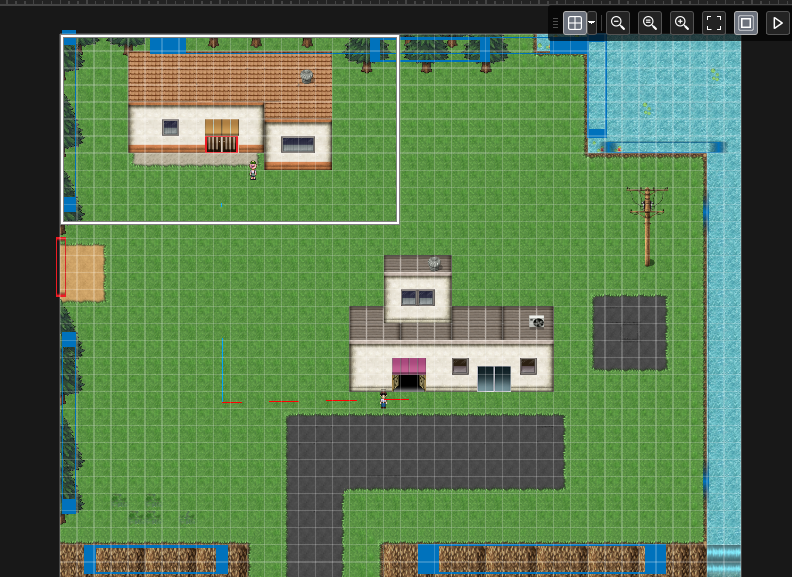
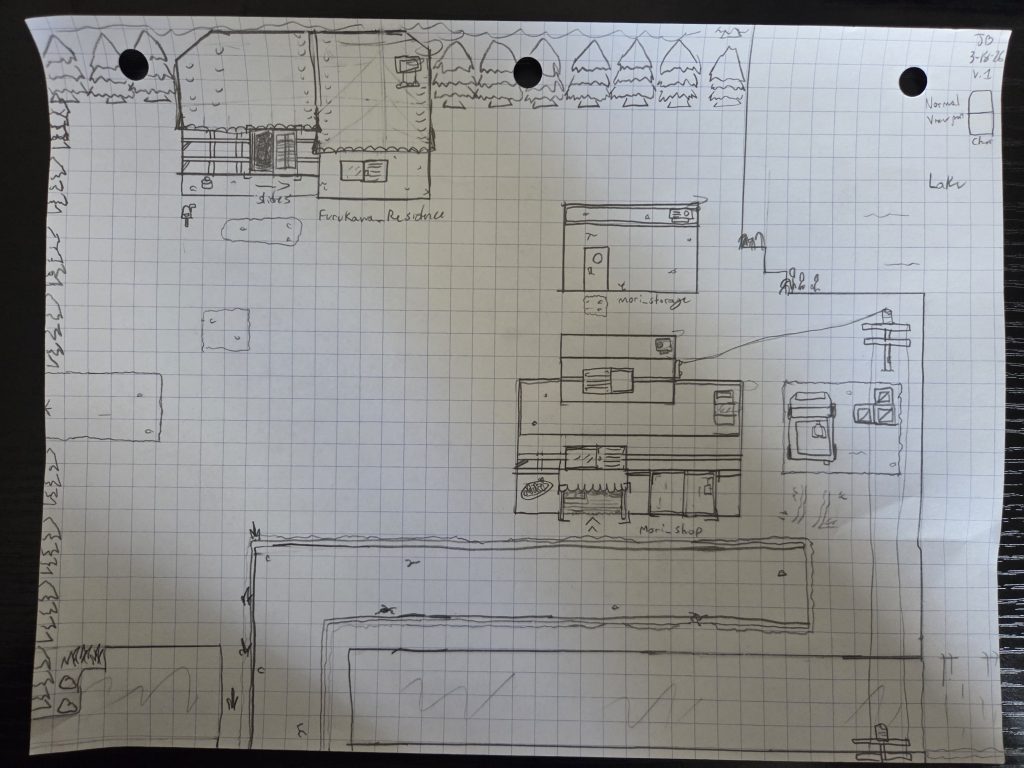
This map took a few hours and is based on the concept art I drew out by hand:
I have decided to patron the Kokoro Reflections tilesets. They were really kind in answering my questions and I am happy with their products so far. Importing their tilesets lead me down a path of learning about Gamemaker 2’s texture atlas and auto-scaling. I now understand the use of the texture page sizing as I spent some time trying to figure out why their tilesets specifically (the ground tiles specifically) were being stretched and ruined in run-time. It was because the source they provide for their non-RPGMaker files are massive in dimensions, and the base texture page of GM2 wasn’t able to handle that appropriately.
So, I had to do some changes to the memory config and I decided to load up all the NPC sprites and animations into their own group as well to help ease some load times during game play.
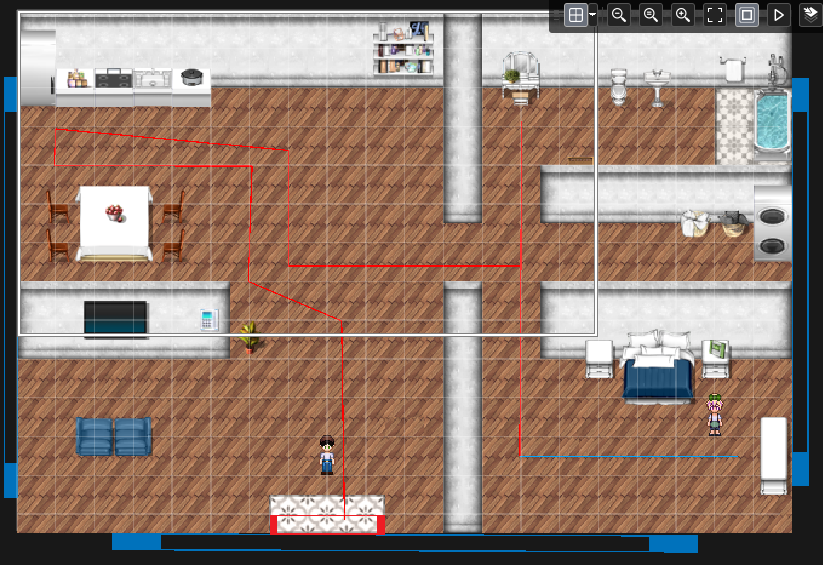
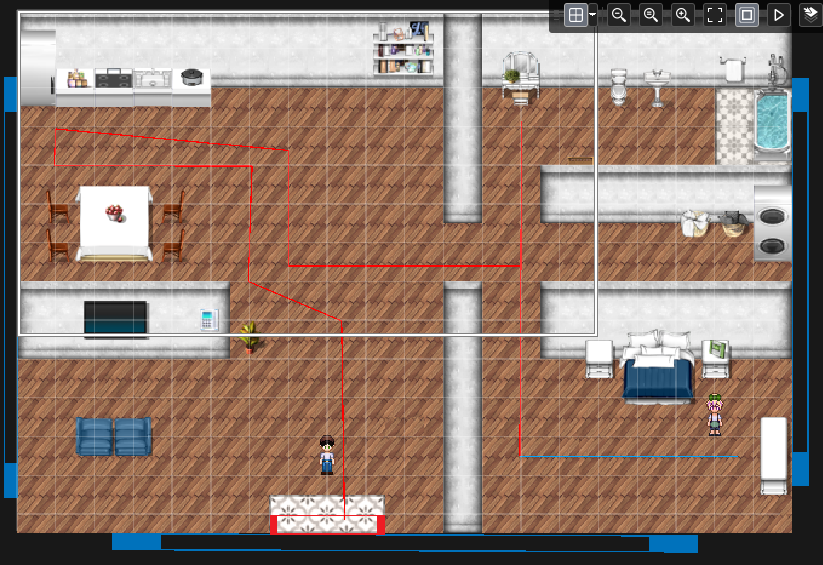
The inside of the house so far. The lines you see are the IDE showing the paths I have in the map. This leads into my next subject.
NPC Schedule Persistence
I had talked about the Scheduler system in an older post, but it was time to update it. Similar to the problem with Object Instances and data, I needed to make some tweaks to have the Schedule system seem persistent. In many of these games, all NPCs run on schedules: these are paths to follow, places to be at at X time, and so on all dependent on the day of the week, the season, the event, or other conditions.
I am an extreme visual learner and thinker, with logic coming in second place. So with some back and forth, the current solution I found is to piece together the schedules on a room load and then send that information to the instance of an NPC so they can find out where they roughly should be for the current game time. This works great if you have static placements for characters, but I currently have functions for them to follow paths, leave rooms, and wander around.
The SpawnManager helps with the “leaving rooms.” Instances remain with collision even if you hide them, which means I had to add a helper function that essentially moves NPCs that are “gone” from the map to a -9999 y point, and then draw them back to where they belong when needed.
Paths are the interesting dilemma I had here. By default they work, but the problem is continuity. I found that if I entered the house, Miyuki would start her path, but if I exited and re-entered, she would re-start the path from the beginning. This makes sense, because the function Scheduler sends to the AIController was to simply follow the path asset. To fix this for now, I added some logic to these systems that reads the number of nodes on the path asset, and based on the time start of the path task and the start of the next task, we approximate which node they should be starting from on room create.
For a path with many nodes like in the house, this works relatively well, but for a simpler path, it’s not quite there. I am thinking on if there may be a way to mathematically get the total number of in-game seconds each travel will take and more accurately start the points that way…
Sound!
What’s an H-game (or any game) without sounds? The big piece of the last two weeks was implementing SoundManager and getting audio assets imported in for BGMs and SFX. I have these load into memory similar to all Sprites in which we load their asset groups on GameInstance create so they’re ready to play. I wanted to future proof for the Options system – hence the need of audio groups to control gain on each one – and level design, so me (and maybe future team members?) can easily override based on certain maps to play specific tracks.
There is an “overworld”, “custom”, and “silent” mode setting that you can use per map. I am designing an audio group to manage all background music tracks, all sound effects, one specifically for H-content sounds, and a placeholder for voice acting (if that ever happens).
Current state of the prototype (VIDEO):
There were a lot of small tweaks as well, and I still have dialogue writing and item wiring to go through. I’d like to release a technical prototype build on the new itch.io page by August for some initial interest building and bug reporting to help me make a more polished, playable prototype by next year!
See y’all later and peace~

Leave a Reply